Ok...Ive got 3ds max 7...which is almost like 3ds max 6 but anyhow I have some models made but I cant texture them...I use the material editor...Then
export model...im sure im doing something wrong because models come with .dds files (what nova did) so i know i gotta create a .dds file of textures i
want on model but I dont know how...if someone could explain to me what to do in a detailed way i would appricate it...thanks.:D
theres a few ways to texture,but the easyest with out uvw maping is convert the dds or picture to a tga then drag and drop it on a material ballthen
drag and drop from the material ball to the model and in the modifier list click uv map then in uv map make changes till you get used to it and figure
out what your doing.
and dont worry about the tga the game still reads tga so just convert the tga to dds when you know the textures are done
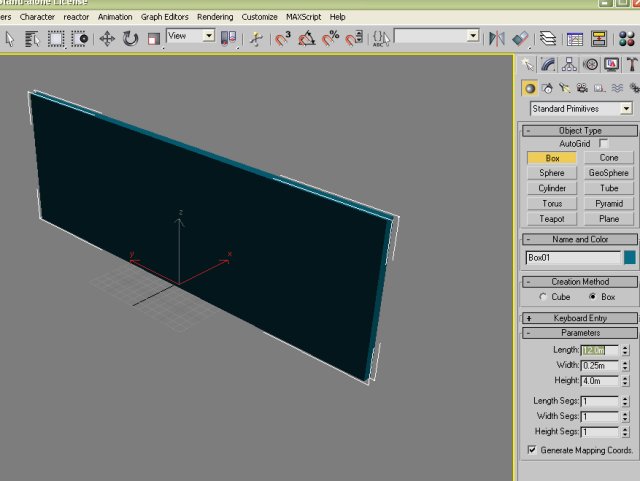
Now, I do a model..say a wall...create a box and adjust it to say 3m high, 12m long, and .25m deep...
Now, create a clone, to be a CB (collision Box) call it CB01_01, then Hide it..
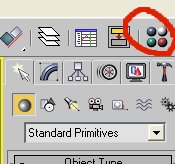
Now, select the "Wall", then select the Material Editor..top right hand corner..
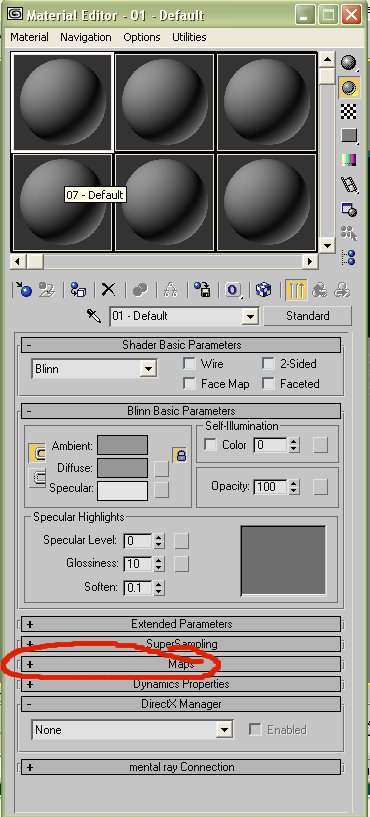
The following window will pop up..
Now, look for the + Maps, as indicated on the pic above..and click on it to bring up the box you need..
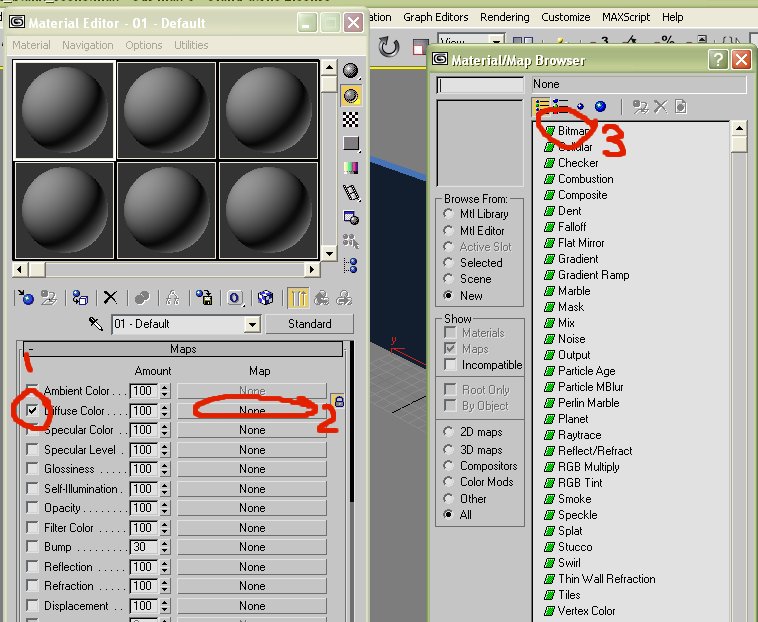
tick diffuse, the the "none", to bring up the "Material/Map Browser", that will bring up a dialog box..locate the folder you created with the textues
you want to usse, then double click on the one you want, and it will appear on the first "Ball"..
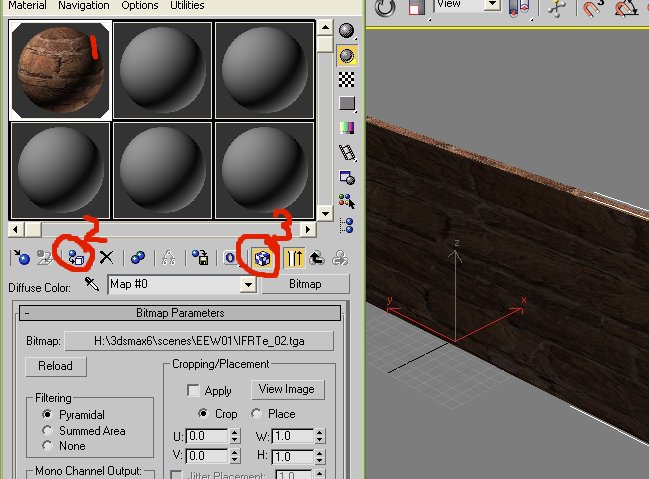
Enure your wall is selcted, then, click on the ball (1) , the, transfer the texture to the wall (2), then show the texture in the window (3).
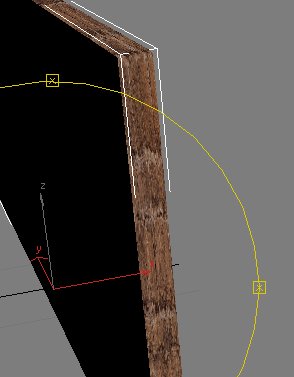
Close off the materails window..rotate your model, and look at the end..see how the texture is closed together..
We can fix that...
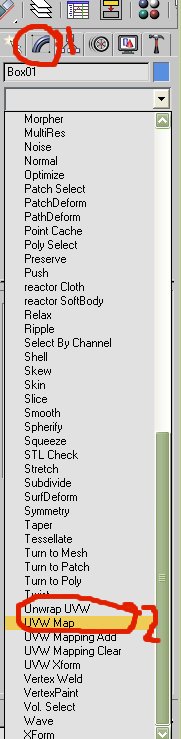
Select the "Wall"..then, on the right, click "Modify" (1), then pull down the "Modifier List", and locate "UVW Map" (2)..
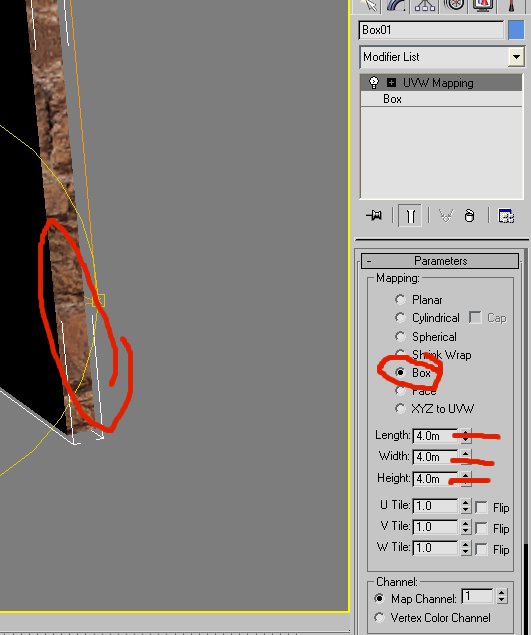
Tick the "Box" radio button, and now in the boxes below..type in 4 in eack box, I use 4 for most things..you can vary this if you want..just make it
an even size for all 3 planes for the best effect..
Now, notice the "End" of your wall is no longer closed up..
Now, rename the main box as 01_00
Now, we need 2 more things before you can use the model..you need a ground point and a centre point..
Create a box .025x.025x.025 and call it ^01_01, clone it and call it _01_01.
Now, allign your wall to a grid line, say x=0, y=0, z=0, also allign the 2 new items to the same, this should put them smack in the middle of the
wall..
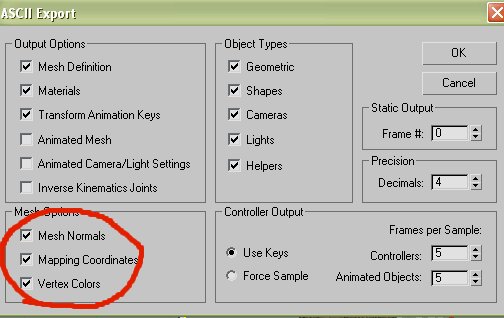
Save your wall as a max item, say Wall01.max...into that same folder you created earlier..then, export the file as an ASE file into the same
folder..Whwn you save, tick all the options in the "Mesh Options"
Now, we need to Nova OED..I'll do that now, in the next Post..
second, select "Tools - Options", and locate a path to your folder where you have the ASE file and the Texture saved..
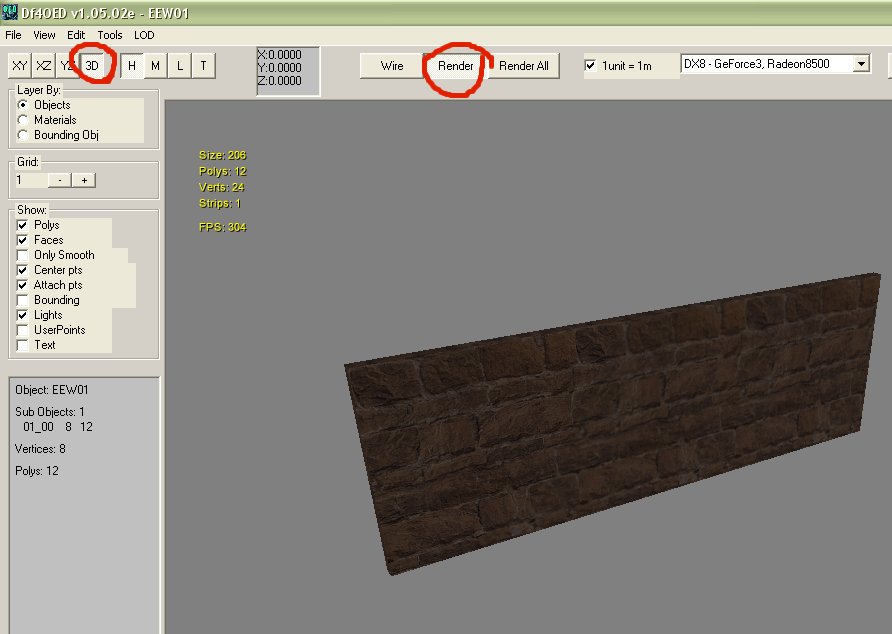
Now, we can import the model..
From the file menu, select "Import 3ds ASCII"., then locate the folder where your ASE file, and the texure is located..select your file..
Tick "3D" and "Render"..make sure it looks OK..
Now, Export the 3di file, name it in the dialog box, and save it in your folder...
Now, copy the 3di file, and the texture to your BHD folder..
Here's where you can use the dds file..use photoshop ..you need the dds plugin for this..
Load up your tga texture, and resave it as a dds file..
The file size will be about 1 third the size..put this file into the BHD/pff file instead, the game will read it ok..even though, if you open the 3di
file in a hex editor, the name is still a tga..
You need to add to the items def file..something like this...
begin "EE Wall 3 metre"
id 1070013
attrib: Landable
type building
graphic EEWall01
end
and save it into your BHD folder..
Create a map with the new item, then run BHD, use the /d command on your BHD icon..
To create a med pic, take a ss from the game, or from max, or the OED..make it 200 x 200 pcx 8bit color to save file size..
Nice rifle LoA.. here in Aus, we used to use the same weapon, only we called it an "SLR" or "L1A1"..mighty fine rifle, 7.62, dead accurate..I can
still take one apart blindfolded..LOL..
I see there's one in the new Jo ESC..I saw it in one of the SS's..









![[*]](images/aventure/default_icon.gif)






 ur scaring me EE lol


